
RAG on Databricks: Part I
Building RAG overtop SEC Form-10k financial performance PDFs

This is Part I of a series on building a Retrieval-Augmented Generation (RAG) solution on Databricks.
Subsequent posts will cover evaluating the RAG solution, fine tuning embedding models, and implementing hybrid search and re-rank to improve retrieval.
For a more detailed follow along refer to my video tutorial.
GitHub Repo: https://github.com/david-hurley/databricks-rag
📚 Background
Problem
Publicly traded US companies have to file SEC Form-10K annually
Form-10K PDF contains information about a companies business and financial condition in text and tables
Digging through Form-10K’s and collating key information is tedious
In the field of Mergers and Acquisitions (M&A), Form-10K’s are used in comparable company analysis, where analysts look to determine the value of a target company by assessing the value of comparable companies that were historically acquired
Solution
The long-term goal is to create an LLM agent that, given a target company, can identify comparable companies and summarize financials from historic Form-10K’s.
To accomplish this, a RAG solution built over top Form-10K PDF’s is necessary so that downstream LLM agents can pull in relevant content via natural language queries.
🕌 Architecture Diagram
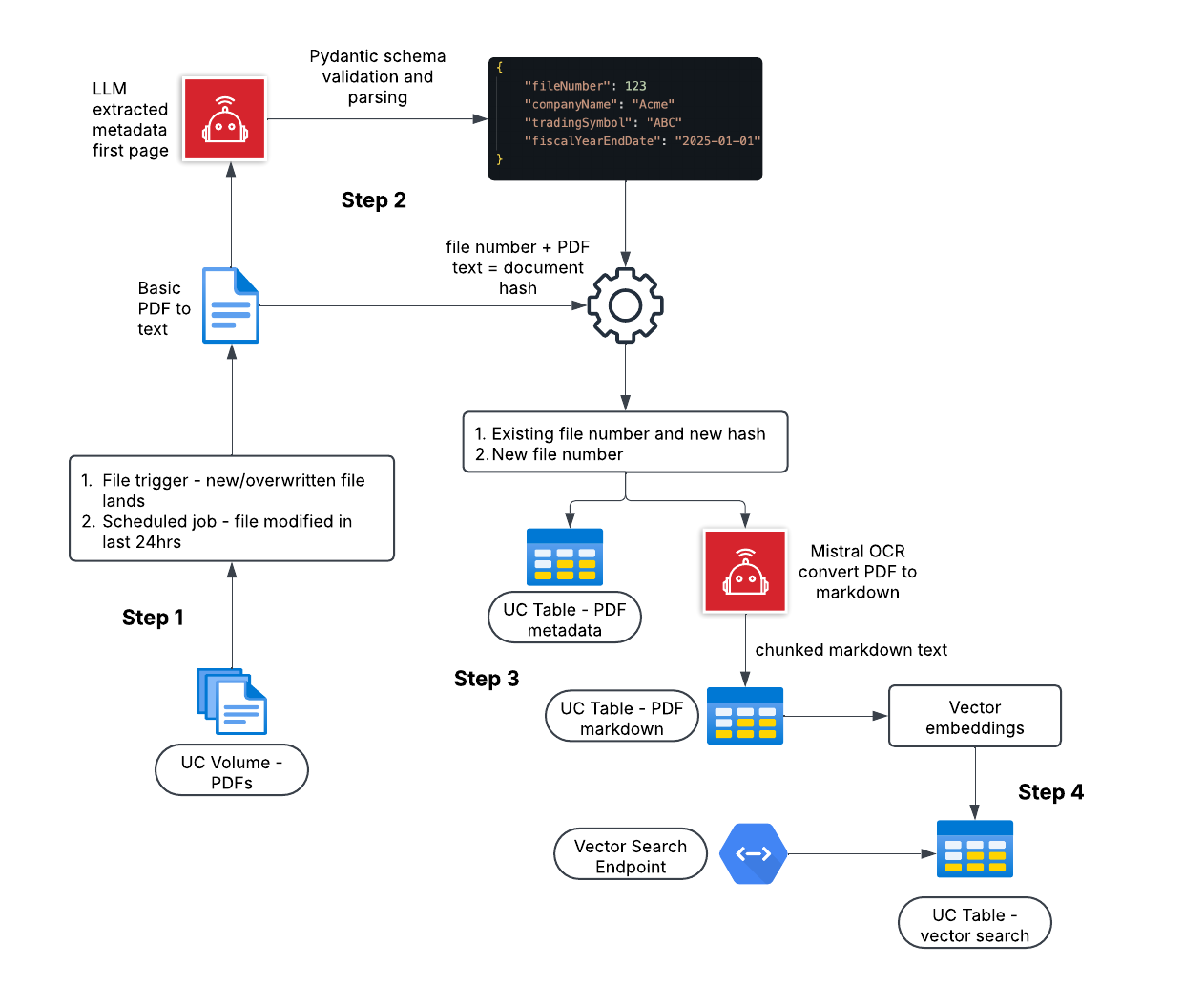
The RAG solution I am building in this tutorial has 4 key steps, each step is covered in detail in sections below.
📫 Step 1
I’m storing Form-10K PDF’s in a managed Unity Catalog (UC) Volume.
Although not implemented here, the logical upstream functionality would be a job that fetches new Form-10K’s from the SEC Edgar API and lands those PDF’s in the UC Volume.
I only want to send newly modified PDF’s (i.e. landed from API) to be processed in the RAG pipeline.
There are 2 options:
File Trigger - every time a new PDF lands a job is triggered and the PDF is sent to be processed
Scheduled (Batch) - every X amount of time, a job is launched and only PDF’s modified since the last job are sent to be processed
In this post I am using Scheduled and looking for PDF’s modified in last 24 hours.
🔭 Step 2
The goal of this step is extract metadata from each PDF and, if the PDF file number already exists in the database, determine if the PDF content has changed.
A crude PDF to text conversion is applied for each PDF using an open-source Python package.
First page of text for each PDF (Form-10K metadata is on first page) is sent, via a managed Databricks endpoint, to OpenAI’s o3-mini model and validated and parsed (using Pydantic) JSON metadata is returned.
A unique document hash is generated for each PDF using the file number and the entire text content of the PDF.
Why do we generate this hash?
If a PDF has a file number that already exists in the database, but the hash is different, this tells us the PDF content has changed, and the PDF should continue through the pipeline. This avoids sending PDF’s with identical content to the more costly OCR model in Step 3.
🤖 Step 3
In this step, i’m using the Mistral OCR API to convert PDF to Markdown. Mistral OCR is a state of the art multimodal model for document understanding - also pretty cost effective.
The risk with using LLM’s for OCR is hallucination.
However, downstream guardrails, such as indicating where content came from in a document, and competitive advantages such as being able to handle a wide variety of document types, languages, and layouts without training, make LLM OCR worth it IMO.
Key parts of Step 3:
JSON metadata is upsert to a UC table - pdf_metadata.
Each PDF is converted to Markdown using the Mistral OCR API.
Markdown text is upsert to a UC table (pdf_markdown_text) in page chunks.
A markdown file is generated for each PDF and stored in a UC Volume.
Step 4
The final step in the RAG solution is to generate vector embeddings for each chunk of Markdown text in the pdf_markdown_text UC table, upsert embeddings to a vector search index, and wrap a Databricks vector search endpoint over the seach index for efficient querying.
Future posts will cover computing embeddings with custom models and fine tuning, but for now, i’m leveraging a lot of Databricks GUI based vector endpoint and search index creation.
Follow along in the video for a overview of this and refer to the Databricks docs.
Thanks for reading! Subscribe to my Substack and YouTube to get fresh content and let me know what you think.
Love your work sir! Ps your YouTube videos are marked as “content made for kids” so I can’t turn on the bell notification to get notified when you’ve created a new video :-/